Gateway API
Overview
The Kubernetes Gateway API is the next-generation networking standard for Kubernetes, designed to replace the traditional Ingress API. XKS uses Gateway API as the core ingress solution, providing a more powerful, flexible, and future-proof way to manage traffic entering your cluster.
Gateway API represents a significant evolution in Kubernetes networking, offering role-oriented design, enhanced expressiveness, and extensive extensibility that addresses the limitations of the original Ingress API.
Note: XKS uses Envoy Gateway as the implementation of Gateway API. For Envoy-specific features like policies, observability, and performance tuning, see the Envoy Gateway documentation.
Migrating from Ingress? See the Ingress Nginx Migration Guide for deprecation information, timelines, and step-by-step migration instructions.
Why Gateway API?
Gateway API brings several significant improvements over the traditional Ingress API. For a detailed comparison and migration information, see the Ingress Nginx Migration Guide.
Key Concepts
Role-Oriented Design
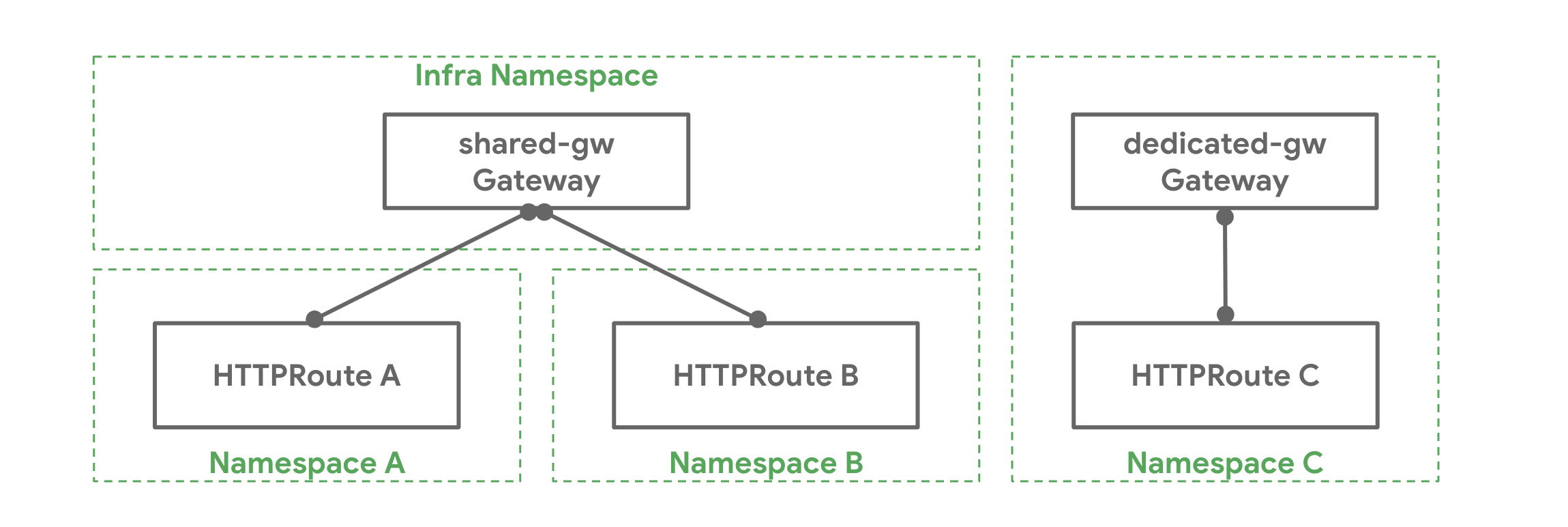
Gateway API introduces a clear separation of concerns between different organizational roles:
- Infrastructure Provider: Manages the
GatewayClassresource, which defines the type of load balancer and its configuration - Cluster Operator: Manages
Gatewayresources, which instantiate load balancers and define listeners - Application Developer: Manages
HTTPRouteand other route resources, which define how traffic is routed to applications
This separation allows teams to work independently while maintaining security boundaries and operational clarity.
Core Resources
GatewayClass: Defines a class of Gateways (similar to IngressClass). In XKS, this is pre-configured by the platform team.
Gateway: Instantiates a load balancer. Managed by cluster operators, it defines listeners (ports, protocols, hostnames) and TLS configuration.
HTTPRoute: Defines how HTTP traffic should be routed. This is what application developers work with most often.
ReferenceGrant: Allows routes to reference resources in other namespaces, enabling secure cross-namespace routing.
For comprehensive documentation of all Gateway API concepts, see the official Gateway API documentation.
Getting Started
Prerequisites
Ensure your namespace has appropriate Network Policies configured to allow traffic from the Gateway. See the Network Policies section below.
Basic HTTP Route
The simplest way to expose an application is to create an HTTPRoute resource. HTTPRoutes define how HTTP traffic should be routed to your services.
First, ensure you have a Service running:
apiVersion: v1
kind: Service
metadata:
  name: example-app
  namespace: tenant
spec:
  selector:
    app: example-app
  ports:
    - name: http
      port: 80
      targetPort: 8080
Create an HTTPRoute to expose this service:
apiVersion: gateway.networking.k8s.io/v1
kind: HTTPRoute
metadata:
  name: example-app
  namespace: tenant
spec:
  parentRefs:
    - name: default-gateway
      namespace: gateway-system
  hostnames:
    - "example-app.example.com"
  rules:
    - matches:
        - path:
            type: PathPrefix
            value: /
      backendRefs:
        - name: example-app
          port: 80
Key points:
parentRefsreferences the Gateway that will handle this route (typically managed by the cluster operator)hostnamesdefines which domain names this route responds torulesdefine matching criteria and backend services- External DNS will automatically create the DNS record
- Certificate management will automatically provision TLS certificates
TLS Configuration
Unlike Ingress, TLS is configured at the Gateway level rather than per-route. The cluster operator will have configured the Gateway with TLS listeners. Your HTTPRoute will automatically use TLS when matching traffic arrives on a TLS-enabled listener.
For most use cases, you simply need to ensure your hostname is included in the Gateway's certificate. In XKS, certificates are automatically managed via Cert Manager with Let's Encrypt.
If you need a custom certificate, you can create a Certificate resource:
apiVersion: cert-manager.io/v1
kind: Certificate
metadata:
  name: example-app-cert
  namespace: gateway-system
spec:
  issuerRef:
    group: cert-manager.io
    kind: ClusterIssuer
    name: letsencrypt
  dnsNames:
    - example-app.example.com
    - api.example-app.example.com
  secretName: example-app-cert
The cluster operator can then reference this certificate in the Gateway configuration.
Path-Based Routing
HTTPRoute supports sophisticated path matching beyond simple prefixes:
apiVersion: gateway.networking.k8s.io/v1
kind: HTTPRoute
metadata:
  name: example-app-paths
  namespace: tenant
spec:
  parentRefs:
    - name: default-gateway
      namespace: gateway-system
  hostnames:
    - "example-app.example.com"
  rules:
    # Exact path match
    - matches:
        - path:
            type: Exact
            value: /api/v1/health
      backendRefs:
        - name: health-service
          port: 80
    # Prefix match for API endpoints
    - matches:
        - path:
            type: PathPrefix
            value: /api/v1
      backendRefs:
        - name: api-service
          port: 80
    # RegularExpression match (if supported by implementation)
    - matches:
        - path:
            type: RegularExpression
            value: "^/v[0-9]+/.*"
      backendRefs:
        - name: versioned-api
          port: 80
    # Default - catch all other traffic
    - matches:
        - path:
            type: PathPrefix
            value: /
      backendRefs:
        - name: frontend-service
          port: 80
Header-Based Routing
Route traffic based on HTTP headers:
apiVersion: gateway.networking.k8s.io/v1
kind: HTTPRoute
metadata:
  name: example-header-routing
  namespace: tenant
spec:
  parentRefs:
    - name: default-gateway
      namespace: gateway-system
  hostnames:
    - "api.example.com"
  rules:
    # Route mobile traffic
    - matches:
        - headers:
            - type: Exact
              name: User-Agent
              value: "MobileApp/1.0"
      backendRefs:
        - name: mobile-api
          port: 80
    # Route beta users
    - matches:
        - headers:
            - type: Exact
              name: X-Beta-User
              value: "true"
      backendRefs:
        - name: beta-api
          port: 80
    # Default backend
    - backendRefs:
        - name: standard-api
          port: 80
Traffic Splitting and Canary Deployments
Gateway API natively supports weighted traffic distribution:
apiVersion: gateway.networking.k8s.io/v1
kind: HTTPRoute
metadata:
  name: canary-deployment
  namespace: tenant
spec:
  parentRefs:
    - name: default-gateway
      namespace: gateway-system
  hostnames:
    - "app.example.com"
  rules:
    - backendRefs:
        # 90% of traffic goes to stable version
        - name: app-stable
          port: 80
          weight: 90
        # 10% of traffic goes to canary version
        - name: app-canary
          port: 80
          weight: 10
As confidence in the canary version grows, you can gradually increase the weight:
# Update to 50/50
- name: app-stable
  port: 80
  weight: 50
- name: app-canary
  port: 80
  weight: 50
Request Mirroring
Duplicate traffic to a test environment without affecting production responses:
apiVersion: gateway.networking.k8s.io/v1
kind: HTTPRoute
metadata:
  name: traffic-mirroring
  namespace: tenant
spec:
  parentRefs:
    - name: default-gateway
      namespace: gateway-system
  hostnames:
    - "app.example.com"
  rules:
    - matches:
        - path:
            type: PathPrefix
            value: /
      backendRefs:
        # Primary backend - responses returned to client
        - name: production-app
          port: 80
      filters:
        # Mirror traffic to test backend - responses discarded
        - type: RequestMirror
          requestMirror:
            backendRef:
              name: test-app
              port: 80
URL Rewriting
Modify requests before they reach the backend:
apiVersion: gateway.networking.k8s.io/v1
kind: HTTPRoute
metadata:
  name: url-rewrite
  namespace: tenant
spec:
  parentRefs:
    - name: default-gateway
      namespace: gateway-system
  hostnames:
    - "app.example.com"
  rules:
    - matches:
        - path:
            type: PathPrefix
            value: /api/v1
      filters:
        # Remove /api/v1 prefix before forwarding
        - type: URLRewrite
          urlRewrite:
            path:
              type: ReplacePrefixMatch
              replacePrefixMatch: /
      backendRefs:
        - name: api-service
          port: 80
Request Header Modification
Add, set, or remove headers:
apiVersion: gateway.networking.k8s.io/v1
kind: HTTPRoute
metadata:
  name: header-modification
  namespace: tenant
spec:
  parentRefs:
    - name: default-gateway
      namespace: gateway-system
  hostnames:
    - "app.example.com"
  rules:
    - filters:
        - type: RequestHeaderModifier
          requestHeaderModifier:
            # Add new headers
            add:
              - name: X-Forwarded-Client
                value: gateway
            # Set headers (replace if exists)
            set:
              - name: X-Custom-Header
                value: custom-value
            # Remove headers
            remove:
              - X-Internal-Header
      backendRefs:
        - name: app-service
          port: 80
Cross-Namespace Routing
HTTPRoute can reference services in different namespaces with explicit permission:
First, the service namespace grants access:
apiVersion: gateway.networking.k8s.io/v1beta1
kind: ReferenceGrant
metadata:
  name: allow-tenant-routes
  namespace: shared-services
spec:
  from:
    - group: gateway.networking.k8s.io
      kind: HTTPRoute
      namespace: tenant
  to:
    - group: ""
      kind: Service
Then the HTTPRoute can reference the service:
apiVersion: gateway.networking.k8s.io/v1
kind: HTTPRoute
metadata:
  name: cross-namespace-route
  namespace: tenant
spec:
  parentRefs:
    - name: default-gateway
      namespace: gateway-system
  hostnames:
    - "app.example.com"
  rules:
    - backendRefs:
        - name: shared-api
          namespace: shared-services
          port: 80
Public and Private Gateways
Similar to the Ingress setup, XKS can provide both public and private Gateways. The default Gateway is public and exposed to the Internet. For internal-only applications, you can create a private Gateway and reference that in the HTTPRoute:
Gateway:
apiVersion: gateway.networking.k8s.io/v1
kind: Gateway
metadata:
  name: private-gateway
  namespace: gateway-system
spec:
  gatewayClassName: envoy
  infrastructure:
    annotations:
      service.beta.kubernetes.io/azure-load-balancer-internal: "true"
  listeners:
  - name: https
    port: 443
    protocol: HTTPS
HTTPRoute:
apiVersion: gateway.networking.k8s.io/v1
kind: HTTPRoute
metadata:
  name: internal-app
  namespace: tenant
spec:
  parentRefs:
    - name: private-gateway
      namespace: gateway-system
  hostnames:
    - "internal-app.example.com"
  rules:
    - backendRefs:
        - name: internal-service
          port: 80
The private Gateway is only accessible from within the virtual network, not from the public Internet.
Policies and Advanced Features
For advanced traffic management features including rate limiting, circuit breaking, timeouts, retries, health checks, load balancing, and observability configuration, see the Envoy Gateway documentation.
These features are configured using Envoy Gateway-specific policy resources:
- BackendTrafficPolicy: Configure backend behavior (rate limiting, circuit breaking, timeouts, retries, health checks, load balancing)
- ClientTrafficPolicy: Configure client-facing behavior (timeouts, HTTP/2, client IP detection)
- SecurityPolicy: Configure security features (CORS, authentication, JWT validation)
Network Policy Configuration
Gateway traffic must be explicitly allowed by Network Policies. Update your namespace's Network Policy to allow ingress from the Gateway:
apiVersion: networking.k8s.io/v1
kind: NetworkPolicy
metadata:
  name: allow-gateway
  namespace: tenant
spec:
  ingress:
    - from:
        - namespaceSelector:
            matchLabels:
              name: gateway-system
  podSelector:
    matchLabels:
      app: example-app
  policyTypes:
    - Ingress
Migration from Ingress
Complete Migration Guide: For comprehensive migration information including deprecation timelines, official documentation links, and detailed step-by-step instructions, see the Ingress Nginx Migration Guide.
Migrating from Ingress to HTTPRoute is straightforward. Here's a quick comparison:
Ingress Example
apiVersion: networking.k8s.io/v1
kind: Ingress
metadata:
  name: example-app
  namespace: tenant
  annotations:
    nginx.ingress.kubernetes.io/rewrite-target: /
spec:
  ingressClassName: nginx
  rules:
    - host: example-app.example.com
      http:
        paths:
          - path: /api
            pathType: Prefix
            backend:
              service:
                name: example-app
                port:
                  number: 80
  tls:
    - hosts:
        - example-app.example.com
      secretName: example-app-cert
Equivalent HTTPRoute
apiVersion: gateway.networking.k8s.io/v1
kind: HTTPRoute
metadata:
  name: example-app
  namespace: tenant
spec:
  parentRefs:
    - name: default-gateway
      namespace: gateway-system
  hostnames:
    - "example-app.example.com"
  rules:
    - matches:
        - path:
            type: PathPrefix
            value: /api
      filters:
        - type: URLRewrite
          urlRewrite:
            path:
              type: ReplacePrefixMatch
              replacePrefixMatch: /
      backendRefs:
        - name: example-app
          port: 80
Key Differences
- No IngressClass: Instead, you reference a
GatewayviaparentRefs - No TLS section: TLS is configured on the Gateway, not the route
- Typed filters: Instead of annotations, use typed filter resources
- Explicit backend references: Use
backendRefsinstead ofbackend - Path matching: More explicit with
typefield (PathPrefix,Exact, etc.)
For detailed migration steps, annotation mapping, and support resources, see the Ingress Nginx Migration Guide.
Debugging
Check HTTPRoute Status
kubectl get httproute example-app -n tenant -o yaml
Look at the status section for information about whether the route was accepted by the Gateway and any error messages.
View Gateway Status
kubectl get gateway default-gateway -n gateway-system -o yaml
Check if the Gateway is ready and which routes are attached.
For advanced Envoy-specific debugging including configuration inspection, statistics, and logging, see the Envoy Gateway Debugging Guide.
Common Issues
HTTPRoute not working:
- Verify the Gateway reference in
parentRefsis correct - Check Network Policies allow traffic from gateway-system namespace
- Ensure the Service exists and has healthy endpoints
- Check HTTPRoute status for acceptance conditions
TLS not working:
- Verify the Gateway has a TLS listener configured
- Check Certificate resource status
- Ensure DNS record points to Gateway IP address
No traffic reaching backend:
- Check Service selector matches Pod labels
- Verify Pod is running and healthy
- Check Network Policies allow traffic within namespace
- Review backend Service port matches HTTPRoute
backendRefsport
Further Reading
- Gateway API Official Documentation - Complete specification and concepts
- Gateway API User Guides - Official tutorials and guides
- Gateway API Best Practices - Recommended patterns
- Official Migration Guide - Kubernetes SIG Network migration documentation
- Envoy Gateway Guide - XKS Envoy Gateway documentation
- Ingress Migration Guide - XKS migration guide and timelines